AI Chatbots
Usage-Based AI Helpdesk Pricing: Per Resolution vs Per Seat
Usage-Based AI Helpdesk Pricing: Per Resolution vs Per Seat
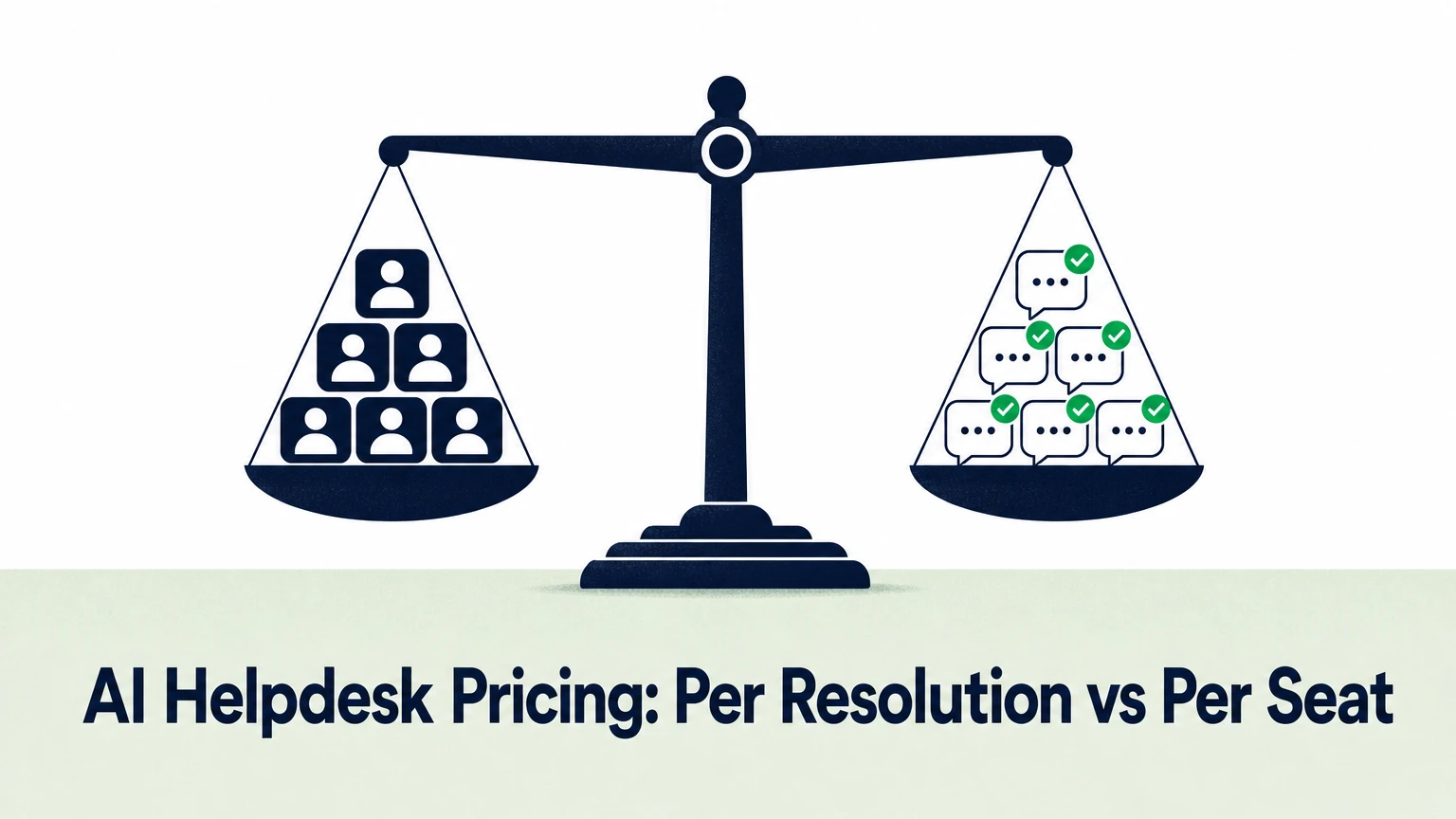
AI helpdesk usage-based pricing charges you for what the AI does — answers, conversations or resolutions — instead of for how many people log in. Per-seat pricing charges for headcount. If your AI handles a growing share of tickets, usage-based pricing tracks your real workload. Per-seat pricing tracks your org chart.
This guide compares the three main AI customer support pricing models, shows where each one breaks, and gives you a simple way to forecast your bill before you sign.
What are the main AI customer support pricing models?
There are three: per seat, per resolution, and per answer or conversation.
Most vendors mix them. A plan can bundle seats, include a monthly allowance of AI interactions, and bill overages on top.
| Model | What you pay for | Cost moves with | Main risk |
|---|---|---|---|
| Per seat | Each human agent license | Headcount | Paying for AI value you can't measure |
| Per resolution | Each conversation the AI closes without a human | Successful automation | Disputes over what counts as "resolved" |
| Per answer / per conversation | Each AI reply or session | AI activity | Paying for answers that didn't help |
The model matters less than the definition behind it. Read the billing unit before you read the price.
How does per-seat pricing work for an AI helpdesk?
Per-seat pricing charges a fixed fee for every agent who uses the platform each month.
It's predictable. Finance likes it because the bill only changes when you hire.
The problem shows up once AI starts doing real work. The goal of an AI agent is to absorb repetitive tickets so your team doesn't grow at the same pace as volume. Seat pricing rewards the opposite. If the AI deflects more tickets, your vendor earns the same. If you add agents to cover a backlog, your vendor earns more.
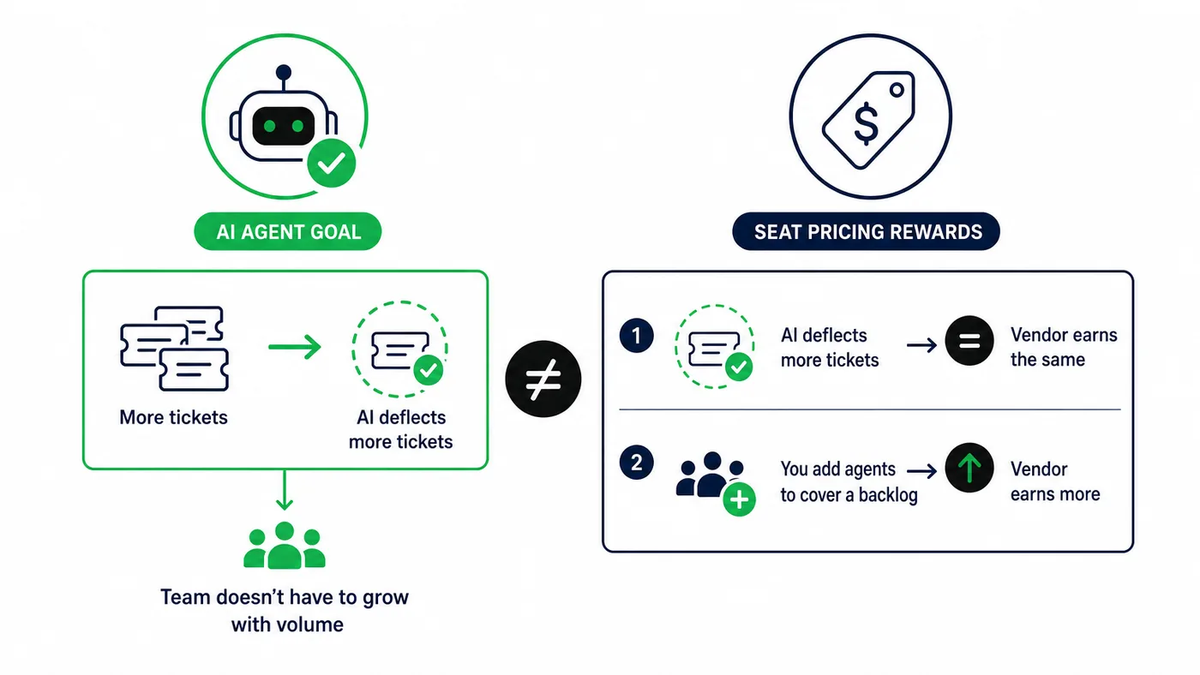
Seat pricing also hides cost. AI features bundled into a seat license look free, but you pay for them on every seat — including agents who rarely use them.
It still fits some teams:
- Small teams with stable ticket volume
- Teams where AI only drafts replies and a human sends every message
- Orgs that need a fixed annual budget line with no variance
What does AI agent pricing per resolution mean?
AI agent pricing per resolution means you pay only when the AI closes a conversation without human help.
It's the most outcome-aligned model. A conversation the AI hands off to a person usually doesn't count. A conversation where the customer leaves unhappy may or may not count — that depends on the vendor's definition.
That definition is the whole contract. Ask three questions:
- Does the customer have to confirm the issue is solved, or does silence count as a resolution?
- If the customer returns with the same issue within 24 or 48 hours, are you billed twice?
- Does a handoff to a human after several AI replies count as a resolution, a partial charge, or nothing?
A loose definition makes per-resolution pricing feel cheap in the demo and expensive in month three. A strict one keeps your cost tied to tickets your team never had to touch.
Per-resolution pricing also tends to carry a higher unit price than per-answer pricing. You pay a premium for the vendor taking on the risk that the AI fails.
Per seat vs per resolution pricing: which costs less?
Per seat vs per resolution pricing comes down to two numbers: your monthly conversation volume and your automation rate.
Run this calculation with your own data.
Start with your monthly conversation volume. Multiply it by the share the AI resolves without a human. That gives you billable resolutions. Multiply those by the per-resolution price. Then compare that total with your current seat cost plus any AI add-on fees. Finally, subtract the seats you no longer need because the AI absorbed that work.
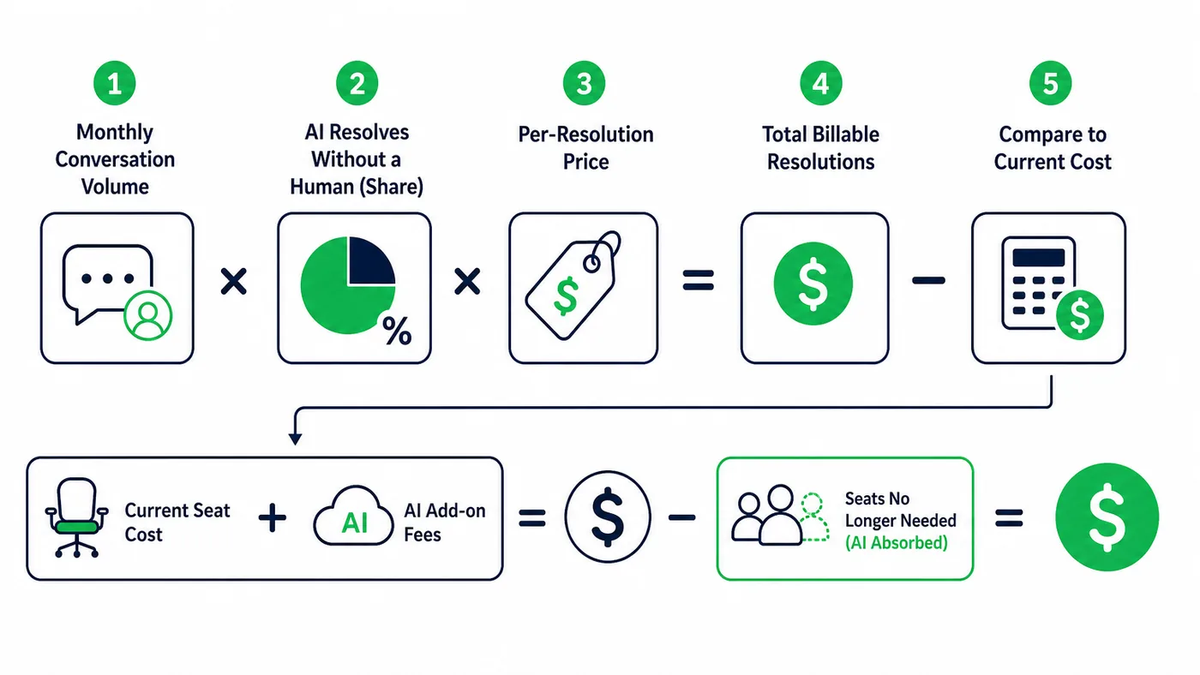
Here is a hypothetical example to show the mechanics, not a benchmark. Say you handle 10,000 conversations a month and the AI resolves 40%. That's 4,000 billable resolutions. At a hypothetical $1.00 per resolution, the AI costs $4,000 a month. If that volume previously needed three agents, you compare $4,000 against the fully loaded cost of those three seats and salaries.
The pattern holds across most scenarios. Low volume and a low automation rate favor seats. High volume and a rising automation rate favor usage-based pricing.
For a wider view of what goes into the total bill — setup, model costs and maintenance — see this breakdown of how much an AI chatbot costs.
Where does per-answer or per-conversation pricing fit?
Per-answer pricing charges for each AI reply, whether or not it closes the ticket. Per-conversation pricing charges for each session.
It sits between the other two. You pay for activity, not headcount, and you don't argue about what "resolved" means.
The tradeoff is clear. A wrong answer still costs you. That's why grounding matters more under this model: an AI that answers only from your documentation and cites its sources wastes fewer billable replies on guesses.
Per-answer pricing works well when:
- Your users ask many short, factual questions about docs, APIs or setup
- You want AI coverage for free and trial users without adding seats
- You use the AI as a copilot that drafts replies inside your helpdesk
How to evaluate AI helpdesk usage-based pricing before you sign
Treat pricing as a forecast, not a sticker. Check these six things on any usage-based plan.
- The billing unit. Answer, conversation or resolution — and the exact definition of each.
- Included volume. How many units the base plan covers each month.
- Overage rate. The price per unit once you pass the included limit.
- Caps and alerts. Whether you can set a spending limit or get warned before overages pile up.
- Handoff behavior. How escalations to human agents are counted and whether full context goes with them.
- Channel coverage. Whether the price covers your website, help center, in-app widget, email, Slack and Discord, or only one channel.
Ask each vendor for a quote built on last quarter's real ticket volume. A price per unit means little until you multiply it by your own numbers.
How Ordemio prices AI customer support
Ordemio uses a hybrid model: a flat subscription with included monthly volume, then a fixed usage rate.
- Startup: $49/month
- Growth: from $299/month
- Elite: custom pricing
- Overage: $0.10 per answer after the included monthly limits
There's no per-seat fee for the AI. You pay for answers, and the price per answer doesn't change with headcount.
That structure fits the pains support teams bring to us: high volumes of repetitive tickets, slow first responses, and pressure to scale without adding headcount at the same rate. The Ordemio AI Support Agent answers from your websites, help centers, files, Google Docs, videos and API documentation. It works inside Intercom, Zendesk and Freshdesk, plus Discord, Slack, webhooks and APIs. It hands complex cases to a human agent with full context, and it can run custom actions through APIs or MCP (Model Context Protocol) servers.
If most of your tickets are product and documentation questions, start with Ordemio's Ask AI agent for customer support. It turns product and developer docs into citation-based answers across your help center, app and community. It's free with your own OpenAI API key, and paid plans start at $49/month.
If your team works in Zendesk, the AI agent copilot for Zendesk drafts and refines knowledge-grounded replies in the ticket composer. Installation is free with an Ordemio subscription. Your agents stay in control of every reply.
FAQ
Is usage-based pricing more expensive than per-seat pricing?
Not by default. Usage-based pricing costs more when the AI handles lots of low-value interactions that don't reduce human workload. It costs less when the AI absorbs a meaningful share of repetitive tickets and you avoid hiring for that volume. Model both options with last quarter's conversation count and your expected automation rate before deciding.
What counts as a resolution in AI helpdesk pricing?
Each vendor defines it differently. Common definitions include the customer confirming the answer helped, the customer not asking for a human, or the conversation ending without a handoff. Ask whether repeat contacts on the same issue are billed again and whether partial AI help before an escalation is charged.
Can I combine per-seat and usage-based pricing?
Yes, and many teams already do. Human agents keep their helpdesk seats, and the AI layer is billed by usage. This hybrid lets you keep a predictable base cost while paying for automation only as it scales. Watch for double charging, where AI features are bundled into seats and also billed per use.
How do I keep usage-based AI support costs predictable?
Set a monthly spending cap or alert, pick a plan whose included volume covers your typical month, and review conversation analytics to find questions that a better help-center article could answer. Grounding the AI in accurate documentation also reduces wasted answers and repeat contacts that inflate usage.
Pick the unit that matches your goal
Seats measure people. Usage measures work. If your goal is to handle more tickets without growing your team at the same rate, your pricing should follow the work.
Want to see what your current ticket volume would cost on a per-answer plan? Compare the Ordemio plans at ordemio.com and run the numbers on last month's conversations.